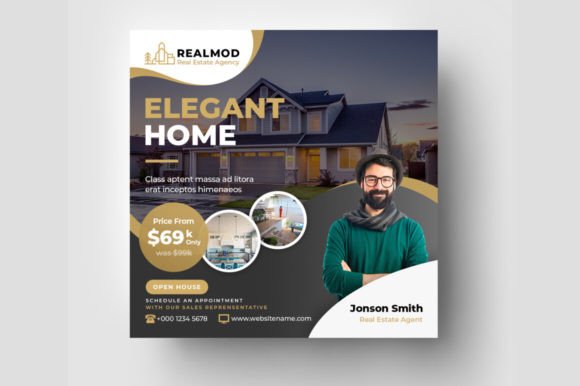
Real Estate Social Media Banner Template: A Practical Tool for Streamlined Visual Content
If you have ever needed to promote a property listing, announce an open house, or build brand recognition for a real estate business, you already know how much time goes into creating polished visuals. The Real Estate Social Media Banner Template is a design resource built for exactly that kind of work. Instead of starting from scratch with every post, this template gives you a structured starting point that still leaves plenty of room for your own creative decisions. It comes as a set of PSD files designed for Adobe Photoshop CC, and each file is arranged around the dimensions and resolution that work best for social media feeds. The result is a tool that helps you move faster without sacrificing quality.
What the Template Actually Includes
The package contains five separate PSD files, plus an information file and a read-me file. Every main element inside these files is fully editable, which means you can swap out text, adjust colours, replace imagery, and rearrange layouts to fit your specific message. The template uses an RGB colour mode, so the colours you see on your screen translate well to digital displays. Resolution is set at 72 DPI, and the canvas size is 1080 by 1080 pixels. That square format is the standard for most social media platforms, especially Instagram, so your graphics fill the frame properly without awkward cropping. A help guide is also included, which is useful if you are still getting comfortable with layered Photoshop files or want to avoid common editing mistakes. The recommended typeface is Montserrat, a clean sans-serif font that keeps your text readable even on smaller screens.
One thing to be clear about from the start: the photos and mockup visuals you see in the preview images are for illustration only. They do not come with the download. You will need to supply your own images, either from your own portfolio, a subscription service like PhotoDune, or free stock photo sites. That is actually a good thing, because it means every graphic you create will feature your own property photos or brand imagery rather than generic placeholder pictures.
Where This Template Fits Into Real Workflows
The most obvious use case is for real estate agents and brokers who need to maintain an active social media presence. But the template also works well for a wider range of people. Marketers handling social media for property developers, rental agencies, or home staging companies can use it to produce consistent visuals across multiple listings. Freelance designers who serve real estate clients can hand off the PSD files as part of a package, making it easier for clients to make small tweaks without requesting design revisions. Even bloggers who write about home buying, interior design, or neighbourhood guides can adapt the template to create branded promotional graphics for their articles.
Consider a typical week for a real estate agent. You might have a new listing going live on Tuesday, an open house on Saturday, and a sold announcement the following Monday. That is three distinct graphics, each with different information and a different tone. With the template, you open a file, replace the property photo, update the address and price, tweak the headline if needed, and export. Instead of spending an hour building each graphic from the ground up, you finish the whole set in twenty minutes. The consistency across the three posts also helps your audience recognise your content faster as they scroll through their feed.
Different Users, Different Benefits
For solo agents and small teams, the biggest advantage is time. You are likely handling showings, calls, paperwork, and marketing all in the same day. A repeatable design system cuts down the friction of producing posts. You do not have to think about font pairing or colour theory every time. The template already handles those decisions. You focus on the content and the property itself.
For marketing departments and agencies, the editable PSD files make collaboration smoother. A junior designer can batch-create several variations for different listings, and a senior designer or manager can review the layered files quickly. Because the template uses smart objects and organised layers, feedback like “move the logo two pixels to the right” or “change the headline colour to match the brand palette” takes seconds to implement. That kind of granular control matters when you are producing graphics at scale.
For content creators and educators who produce real estate tips or market analysis, the template becomes a presentation tool. You can use it to highlight key data points like average days on market, price trends, or neighbourhood comparisons. The clean Montserrat typography and square format work well for quote-style posts, tip cards, and even short educational carousels. Instead of relying on text-only posts, you provide a visual anchor that encourages more engagement.
Scenarios That Show the Template in Action
Imagine you are a home stager who works with multiple agents. You want to showcase before-and-after transformations on Instagram. With the template, you can create a series of side-by-side visuals that keep the same branded frame while the photos change. Followers start to associate that specific layout with your staging work, which builds a visual identity over time. You do not need to be a graphic designer to pull it off. You just need basic Photoshop skills and your own images.
Think about a property management company that handles dozens of rental units. Every time a unit becomes available, you need to post it across Facebook, Instagram, and sometimes LinkedIn. The template lets you produce a consistent graphic for each listing, using the same colour scheme and logo placement. Prospective tenants see a polished, professional feed instead of a collection of mismatched photos with different filters and fonts. The confidence that comes from a uniform presentation can make a difference in how serious applicants view your company.
Now picture a real estate coach or educator who runs online courses. You want to promote a new webinar or downloadable guide. Instead of building a promotional graphic from scratch each time, you open the template, swap in a relevant background image, update the headline and date, and export. That speed means you can test different headlines or calls to action without investing a lot of design time. If one version performs better, you replicate that approach for future promotions.
What to Consider Before You Download
Before you purchase or download the template, take a moment to think about your own workflow. This is a Photoshop-based resource, so you need access to Adobe Photoshop CC or at least a version that can open layered PSD files. If you use other design software like Affinity Photo, GIMP, or Canva, you may need to convert the files or look for a template format that matches your preferred tool. The template is built for RGB and 72 DPI, which is ideal for screens, but keep in mind that these files are not meant for large-format printing. If you want to produce flyers or yard signs from the same design, you will need to adjust the resolution and colour mode.
Another practical consideration is font availability. The template uses Montserrat, which is a free Google Font, so you can download it without cost. But if you want to substitute a different typeface, test how it looks at smaller sizes on a phone screen. Some fonts that look elegant on a desktop monitor become hard to read when scaled down for an Instagram feed. Montserrat works well partly because it remains legible even at small sizes, so if you replace it, keep legibility as a priority.
You should also consider how many variations you actually need. The package includes five PSD files, which is a good number for a small business or solo agent. If you manage a large team or produce dozens of posts weekly, you might eventually want a more extensive library or a system that integrates directly with scheduling tools. But for most users, five files are enough to create a solid content bank. You can reuse them by saving new versions with different images and text, then archive the ones you have already posted.
How the Template Connects to Real Outcomes
The features listed in the product description are not just technical specs. They translate directly into everyday advantages. The 1080x1080 pixel dimension means your graphics look sharp and fully framed on Instagram, Facebook, and LinkedIn without unexpected cropping. The 72 DPI is standard for digital display, so your file sizes stay manageable and uploads are fast. The RGB colour mode ensures that the blues, greens, and neutrals you pick for your brand show up as you intended rather than appearing dull or washed out.
The easy customizability mentioned in the description is not marketing exaggeration. When each layer and element is editable, you avoid the frustration of trying to delete or modify something that is locked into a flattened image. You also get the freedom to experiment. Try different background colours, move the headline to the bottom, add a second photo. The template becomes a starting point rather than a rigid container. That flexibility is what makes it valuable across different use cases, from a quick open house post to a polished brand campaign.
Finally, the included help guide and read-me file are small additions that save time, especially if you are not a Photoshop expert. Instead of searching online for how to replace a smart object or change a layer colour, you check the guide and keep working. That reduction in friction matters when you are producing content on a deadline or between client meetings.
Wrapping Up the Practical Side
Social media visuals for real estate do not need to be complicated to be effective. The Real Estate Social Media Banner Template offers a straightforward way to produce consistent, professional-looking graphics without reinventing the design wheel every time. Whether you are an agent managing your own marketing, a designer supporting multiple clients, or a blogger sharing housing market insights, the template gives you a reliable structure. The real value is in what it removes: the guesswork, the repeated formatting, and the time spent aligning text boxes. With those friction points handled, you can focus on the actual content of your posts and the properties or ideas you want to highlight.