Duloga PowerPoint Template: An Evaluation for Professional Presentation Design
When preparing a presentation, the choice of template can significantly influence how an audience receives your message. The Duloga PowerPoint Template is a comprehensive presentation design solution that aims to bridge the gap between data-heavy reporting and visually compelling storytelling. With a total of 150 slides spread across five color variations and 30 slides per thematic set, this template offers a structured approach to building presentations that balance graphical impact with content clarity. For professionals who regularly create slide decks for business reviews, marketing proposals, or educational sessions, understanding what this template provides—and where it may fall short—is essential for making an informed decision.
This article evaluates the Duloga PowerPoint Template from the perspective of a buyer or user who is comparing options, weighing practical benefits against limitations, and deciding whether this template aligns with their specific presentation needs. Rather than simply listing features, we explore how the template functions in real-world scenarios, what tradeoffs exist, and when alternatives might better serve your goals.
What Duloga PowerPoint Template Offers at a Glance
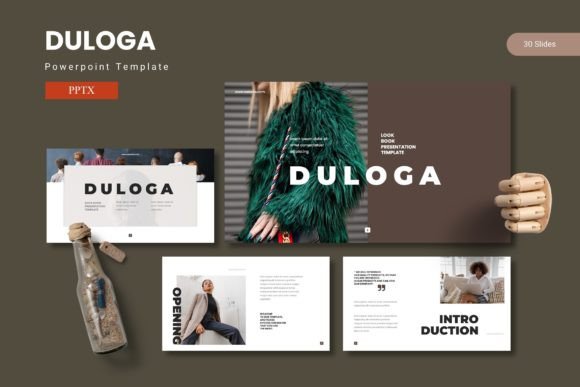
The Duloga PowerPoint Template is built around the idea of providing a complete presentation toolkit. It includes 150 total slides, organized into five premade color schemes, with 30 slides available for each color variant. The structure includes section break slides, handcrafted infographics based on master slides, and pixel-perfect illustrations that are fully resizable and editable. Picture placeholders allow drag-and-drop image insertion, and there are dedicated gallery and portfolio slides. The main file package contains five PPTX files (one for each color scheme), each offering 30 slides, along with a ReadMe file and information about fonts and photos.
What distinguishes this template from simpler options is its reliance on master slides. This means that design elements such as colors, fonts, and background graphics are controlled centrally. When you edit a master slide, all related slides update automatically. This can save considerable time when you need to maintain consistency across a long deck. The handcrafted infographics are another notable element—they are designed to present data in a visually structured way without requiring advanced design skills.
For someone who needs to produce professional presentations regularly, the template reduces the friction of starting from a blank slide or manually formatting each page. However, the value of any template depends on how well its predefined structures match your content and workflow.
Benefits That Support Efficient Presentation Creation
One of the primary benefits of the Duloga template is its built-in variety. With five color schemes available out of the box, you can select a palette that aligns with your brand or the tone of your presentation without having to manually adjust colors across dozens of slides. The 30 slides per scheme cover a range of layouts: title slides, content slides, section dividers, data visualization pages, and portfolio or gallery layouts. This breadth means you are unlikely to run out of layout options for common presentation needs.
The drag-and-drop picture placeholders are a practical time-saver. Instead of resizing and cropping images manually, you can insert photos directly into predefined frames. This is particularly useful for portfolio presentations, case studies, or any deck that relies heavily on visual assets. Similarly, the resizable and editable illustrations allow you to adjust graphic elements to fit your content without losing resolution or design integrity.
Another benefit is the inclusion of section break slides. In longer presentations, section breaks help audiences follow the narrative structure. The template provides dedicated slides that visually separate different parts of your deck, which can improve the overall flow and professionalism of your presentation.
For users who need to present data, the handcrafted infographics offer a way to represent numbers and relationships without resorting to default PowerPoint charts. While they are not interactive, they are designed to be clear and immediately understandable. If your presentation involves KPIs, timelines, or comparative data, these infographics can serve as a starting point for more polished visual communication.
Tradeoffs and Considerations to Keep in Mind
Despite its strengths, the Duloga PowerPoint Template comes with tradeoffs that potential buyers should consider. First, the template provides 30 slides per color scheme. While this is sufficient for many standard presentations, highly complex or lengthy decks may require more variety. If you need to create a 100-slide training module or a detailed annual report, you may find yourself reusing the same layouts repeatedly. This is not necessarily a flaw, but it means the template is better suited for medium-length presentations rather than extensive documents.
Second, because the template relies on master slides, any customization you want to apply globally must be done through the master view. For users unfamiliar with PowerPoint's master slide functionality, there is a learning curve. Making changes to individual slides without understanding the master-slide relationship can lead to inconsistencies. The included ReadMe file provides guidance, but users should be prepared to spend a few minutes understanding the structure before diving into content creation.
Another consideration is the visual style. The Duloga template appears to be designed for a modern, clean aesthetic with a focus on geometric shapes and iconography. While this works well for technology, business consulting, and creative industries, it may not be ideal for more traditional or conservative environments. If your organization requires a more minimal or text-heavy approach, the graphical elements might feel excessive. Similarly, if your brand uses very specific colors or typography, the five premade schemes may not match perfectly, and adjusting them requires some design effort.
File size is another practical factor. Templates with many slides, embedded graphics, and multiple color variations can result in larger file sizes. This may affect loading times, especially on older computers or when sharing files via email. Users should be aware that the PPTX files may be bulkier than a simple blank presentation.
Expectations Around Customization and Flexibility
When evaluating this template, it is important to set realistic expectations about customization. All graphics are resizable and editable, which means you can change colors, shapes, and sizes to some degree. However, the template is not a fully modular design system. The infographics and illustrations are prebuilt, so you are limited to the variations the designer included. If you need a completely unique data visualization or a specific layout, you may need to build it from scratch or combine elements from different slides.
The five color schemes are predefined. While you can manually override colors, the template is designed around these palettes. If you are comfortable working with PowerPoint's color tools, you can adapt them, but it requires additional effort. For users who want a template that automatically matches a brand color with a single click, this may not be the most efficient option.
Additionally, the template includes placeholder content and sample images. To create a professional final product, you will need to replace all sample text and photos with your own. The quality of the final presentation depends heavily on the quality of your content. A template can enhance good content, but it cannot compensate for weak messaging or poorly chosen images.
Scenarios Where Duloga PowerPoint Template Is a Strong Fit
The Duloga template is well-suited for professionals who create presentations on a regular basis and need a reliable starting point that saves time. If you work in marketing, business development, consulting, or education, and you frequently present to clients, stakeholders, or students, this template provides a solid foundation. The variety of slide types means you can create a coherent deck without needing to design each page individually.
It is also a good choice for portfolio presentations. The gallery and portfolio slides are designed to showcase images, case studies, or project examples in a visually appealing grid or layout. For creative professionals, architects, photographers, or designers who need to present their work, these dedicated slides add a polished touch that standard templates often lack.
Another strong use case is team presentations where multiple people contribute slides. Because the template uses master slides, everyone can work within the same design system, ensuring that the final deck has a unified look. This reduces the need for last-minute formatting adjustments.
For users who value handcrafted infographics, the template offers a way to include data visualization that feels more designed than default PowerPoint charts. If your presentation requires showing timelines, processes, or comparisons, these infographics can make the information more digestible.
When Alternatives May Be Worth Considering
While the Duloga template has clear strengths, there are situations where alternatives might serve you better. If you need a template that offers hundreds of slide layouts for very long presentations, you may want to look for a more extensive library or a modular system that allows for greater flexibility. Some templates offer 200 or more unique slides, which might be necessary for training manuals or comprehensive reports.
If your organization has strict brand guidelines with specific colors, fonts, and design rules, a fully customizable template or a brand-specific design kit might be more efficient. While Duloga can be adapted, it requires manual adjustments that may not be practical if you need to maintain a precise brand identity across many presentations.
For users who are not comfortable with PowerPoint's master slide functionality, simpler templates that rely on direct formatting may be easier to work with. Some templates are designed for drag-and-drop simplicity without requiring users to understand the master-slave relationship. If you want to avoid any learning curve, a more straightforward template could be a better fit.
Additionally, if your presentation style is minimal and text-driven, a template with fewer graphical elements might be more appropriate. The Duloga template emphasizes visual design, which is beneficial for engaging audiences, but it may feel cluttered if your content is primarily textual or if you prefer a more understated look.
Practical Decision-Making Insights
To determine whether the Duloga PowerPoint Template aligns with your goals, start by considering the length and purpose of your typical presentations. If you often create decks that are 20 to 40 slides long and require a mix of text, data, and images, this template provides a coherent structure. For shorter presentations or those that need a very specific layout not covered by the template, you may need to supplement with additional slide designs.
Assess your comfort level with PowerPoint. If you are experienced with master slides and enjoy customizing templates, you will be able to take full advantage of what Duloga offers. If you prefer a plug-and-play experience with minimal effort, you may need to invest some time upfront to understand the file structure. The ReadMe file is helpful, but it is not a substitute for hands-on exploration.
Consider the visual style in relation to your audience. A modern, graphically rich template works well for forward-thinking audiences in creative or tech fields. For more traditional or conservative audiences, you may want to tone down some of the visual elements or choose a color scheme that is more subdued. The five premade colors give you some flexibility, but they may not cover every scenario.
Finally, factor in the value of time saved versus time invested in customization. If you can use the template as-is with minimal changes, it offers excellent efficiency. If you need to significantly alter colors, fonts, or layouts, the time savings are reduced. Evaluate how closely the template matches your typical presentation needs before purchasing.
In summary, the Duloga PowerPoint Template is a well-constructed toolkit for creating professional presentations that combine data and graphics. It offers a range of layouts, handcrafted infographics, and master-slide efficiency that can benefit many users. However, its suitability depends on your presentation length, design preferences, technical comfort, and brand requirements. By weighing these factors honestly, you can decide whether Duloga is the right foundation for your next presentation or whether an alternative would better fit your workflow.